
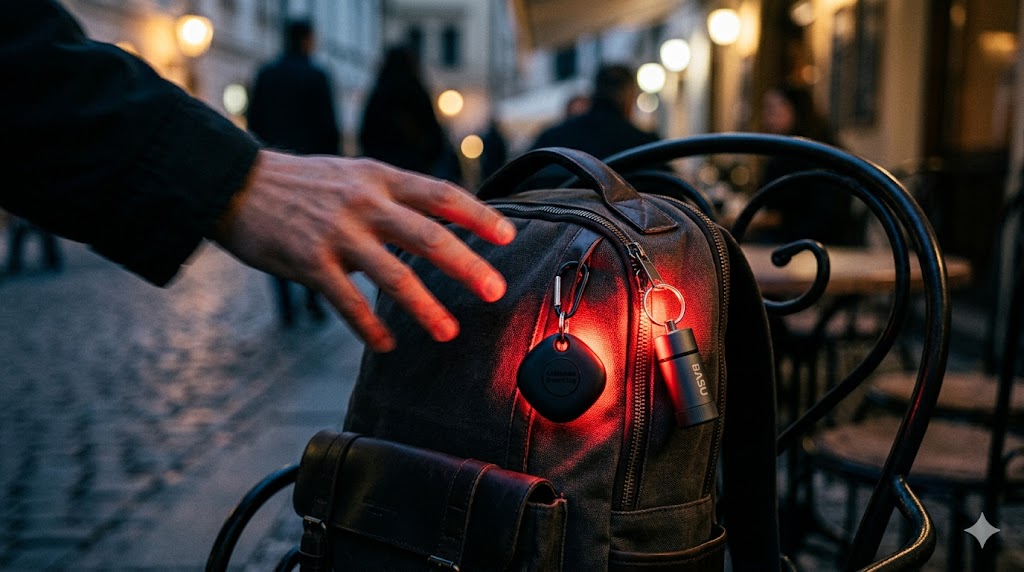
It was a Tuesday afternoon in the Alfama district. I’d been at the same table for three hours — good WiFi, strong coffee, a client deadline at 5pm. I got up to refill my water bottle from the counter. Twenty seconds, maybe thirty. When I turned back, a man I hadn’t noticed before was lifting my backpack off the chair.
What happened next was loud. Very loud. The BASU eAlarm pull-pin I’d rigged from my bag handle to the chair leg snapped taut, the pin popped out, and 120 decibels of continuous siren filled the entire café. Every head turned. The man dropped the bag, walked out fast, and was gone. The staff barely reacted — they’d probably seen it before. I sat back down, reinserted the pin, and finished my coffee.
That thirty-second gap is the specific vulnerability every digital nomad with a laptop creates every single day. And it’s solvable for under $100 total — with a layered system that combines passive location tracking if something does disappear, and active deterrence to stop the grab before it happens. This guide covers both layers with the specific products I’d put in the kit today.
The Anti-Theft System at a Glance
| Product | Type | Network | Battery | Tier | My Take |
|---|---|---|---|---|---|
| Apple AirTag 4-Pack | Passive tracker | Apple Find My | 1 year CR2032 | Premium | Best network on earth |
| Samsung SmartTag2 4-Pack | Passive tracker | Samsung SmartThings | 500 days | Mid-Range | Built right for Android |
| Life360 Tile | Passive tracker | Tile cross-platform | 1 year CR2032 | Budget | Works on any phone |
| BASU eAlarm | Active deterrent | N/A — audible alarm | Replaceable | Specialist | The one that stopped the grab |
Apple AirTag 4-Pack — The Tracking Network That Covers the Planet
Let me be direct about why I carry these. It’s not the AirTag itself — it’s the network it runs on. Every iPhone, iPad, and Mac on earth is a silent relay station for the Find My network. When your bag moves past any Apple device — and in most major cities that happens every few seconds — the AirTag silently logs its coordinates and reports back to your phone. The density of that network in the places digital nomads actually work — Lisbon, Chiang Mai, Medellín, Tbilisi — is genuinely remarkable.
Ultra-Wideband: The Difference Between “Nearby” and “Exact”
Standard Bluetooth trackers tell you your bag is within 50 metres. That’s useful in a hotel lobby. It’s less useful when your bag is somewhere in a seven-storey apartment block in a neighbourhood you’ve never been to.
The AirTag’s Ultra-Wideband U1 chip changes this. When you’re within UWB range — roughly 10–15 metres — Precision Finding activates on your iPhone and the screen shows a directional arrow pointing directly at the tag with a distance countdown in centimetres. I’ve used this twice. Once to find a bag I’d left in a café booth that was out of sight from the door. Once to find luggage that airport staff had placed in the wrong baggage area. Both times I found the item in under ninety seconds. Without UWB, I’d have been searching by ear, ringing the AirTag’s built-in speaker and listening for it.
The 4-pack is the correct way to buy these. One in the laptop bag. One in a checked bag if you check luggage. One on your keychain. One inside your tech pouch. Each tagged item gets independent tracking. If your bag gets separated from your tech pouch during a theft, you know where both of them are.
The honest design limitation: no built-in keyring hole. Apple’s decision to make the AirTag a smooth disc with no attachment point is genuinely frustrating for travel use. You need either a third-party adhesive mount or a keyring holder — both are cheap and widely available, but it’s an extra purchase that shouldn’t be necessary.
Rated 4.8★ on Amazon.ca — the reviews are predominantly from people who’ve used it in exactly the scenarios I’m describing: lost luggage, stolen bags, misplaced gear.
Real scenario — Madrid Metro, afternoon rush: A friend’s tech pouch was lifted from her daypack during the Atocha crush. She didn’t notice until she was at the door of her Airbnb. AirTag in the pouch showed it moving — still on the metro, two stops back. Transit security met her at the platform. The thief had dropped it on a seat. Recovered intact. Without the AirTag, that pouch and everything in it was gone.
Pros:
- Find My network — the largest passive tracking infrastructure available anywhere
- Precision Finding with UWB — directional centimetre-level accuracy at close range
- IP67 fully waterproof — survives everything a bag goes through
- 1-year battery on standard CR2032 — no charging management
- 4-pack covers every critical item simultaneously
Cons:
- Apple ecosystem only — zero meaningful functionality for Android users
- No built-in keyring hole — requires third-party mount for bag attachment
- Can be detected by non-iPhone users using Android AirTag scanner apps
| Score | Rating |
|---|---|
| Airport Usability | 5/5 |
| Portability | 5/5 |
| Setup Convenience | 4/5 |
| Value for Travel | 4.5/5 |
📍 Premium Pick Apple AirTag 4-Pack For iPhone users, this is the tracking system I’d tell you to buy without hesitation. The Find My network density in major nomad cities is genuinely impressive. One in every critical bag. Buy the 4-pack — the per-unit cost makes individual packs look like a bad deal. 👉 View Best Price on Amazon.ca
Samsung SmartTag2 4-Pack — The One That Got the Physical Design Right
Here’s what frustrates me about the AirTag conversation: Samsung looked at Apple’s design, identified every physical ergonomics flaw, and fixed all of them. The SmartTag2 has a built-in metal loop. Not a separate accessory — a metal ring integrated into the body that takes a carabiner, a zip tie, or a braided cable directly without any additional purchase. That one design decision makes the SmartTag2 more practical for daily bag attachment than the AirTag out of the box.
500 Days of Battery Life — Why It Actually Matters for Long Travel
The AirTag lasts roughly one year on a CR2032 battery. The SmartTag2 lasts 500 days. On a day-to-day basis, that difference is invisible — you’re not thinking about battery life on either tracker until it dies. But on a long trip where you’re not near familiar retail stores, the SmartTag2’s extended life means one fewer item to manage. I’ve had an AirTag battery die in rural Vietnam. Finding a CR2032 took three days. The SmartTag2’s extra 135 days of life would have cleared that window entirely.
The SmartThings network that powers the SmartTag2 has meaningfully expanded since launch — it now leverages hundreds of millions of Samsung Galaxy devices globally. In European cities, Southeast Asia, and South Korea specifically, the network density is strong. In North America outside major metro areas, it’s thinner than the AirTag’s Find My — a real consideration for Canadian road trips and rural travel.
Compass View functions similarly to AirTag’s Precision Finding — an AR-guided directional search at close range. Samsung also added a two-way function: pressing the SmartTag2 button makes your phone ring, which the AirTag can’t do. If your phone is lost at camp rather than your bag, the SmartTag2 covers both scenarios.
Rated 4.5★ on Amazon.ca — Android users consistently call this the most practical tracker available for their ecosystem, specifically praising the built-in loop.
Real scenario — Airport transfer, Bangkok to Chiang Mai: Domestic flight, checked a bag for the first time on the trip. SmartTag2 inside the bag. Landed in Chiang Mai, bag didn’t appear on the belt after 25 minutes. SmartThings showed it stationary at Suvarnabhumi — still in Bangkok. Had the airline reference number, bag arrived on the next flight three hours later. Without the tracker, that’s a 45-minute conversation with lost luggage staff and no certainty of outcome.
Pros:
- Built-in metal loop — attaches directly to any bag without additional accessories
- 500-day battery — longest in the category, reduces maintenance on long trips
- Compass View AR finding — directional search at close range
- Two-way function — press tag to find phone, not just phone to find tag
- IP67 fully waterproof
Cons:
- Samsung/Android ecosystem primarily — reduced function with iPhone
- SmartThings network smaller than Apple Find My in North America
- Slightly larger form factor than AirTag
| Score | Rating |
|---|---|
| Airport Usability | 5/5 |
| Portability | 4.5/5 |
| Setup Convenience | 5/5 |
| Value for Travel | 5/5 |
📍 Mid-Range Pick Samsung Galaxy SmartTag2 4-Pack For Android users, this is the correct tracker — full stop. The built-in loop fixes the AirTag’s most frustrating physical design flaw, and 500 days of battery life reduces the maintenance overhead on long trips. If your phone is a Galaxy, this is the system you want. 👉 View Best Price on Amazon.ca
Life360 Tile Bluetooth Tracker — For Everyone Who Doesn’t Want Ecosystem Lock-In
Here’s the situation where I’d recommend the Tile over either Apple or Samsung: you and your travel partner use different phones. One iPhone, one Android. You want to track the same shared daypack. Neither the AirTag nor the SmartTag2 lets both of you see the location from a single tracker — the tracking is locked to the ecosystem that registered the device.
The Tile runs on a standalone app that works identically on both iOS and Android. Two people with two different phones can both see the location of a single tagged item. For couples, families, or any shared gear situation where multiple people need access to the same tracker, this cross-platform design is the only solution that works.
The Tile network — powered by phones running the Tile app — is smaller than both Apple’s Find My and Samsung’s SmartThings. In major cities with dense nomad populations, the network covers most scenarios adequately. In remote or rural locations, coverage becomes less reliable. This isn’t the tracker for a week of solo bikepacking in the backcountry — it’s the tracker for shared urban travel gear.
The reverse-find button is genuinely useful. Double-press the Tile and your phone rings — even on silent. I’ve used this three times. Not for security situations — for the phone-buried-in-a-messy-Airbnb situation that happens on every trip.
Rated 4.4★ on Amazon.ca — consistently reviewed positively by mixed-device households and couples who couldn’t use ecosystem-locked alternatives.
Pros:
- Cross-platform iOS and Android — both phones can track the same device
- Built-in attachment hole — no accessories needed
- Reverse-find button — makes phone ring from the tag
- IP67 waterproof
- Most affordable tracker in this comparison
Cons:
- Smaller network than Apple Find My or Samsung SmartThings
- No UWB Precision Finding — Bluetooth proximity only at close range
- Less useful in rural or low-device-density areas
| Score | Rating |
|---|---|
| Airport Usability | 4/5 |
| Portability | 5/5 |
| Setup Convenience | 5/5 |
| Value for Travel | 4/5 |
📍 Budget Pick Life360 Tile Bluetooth Tracker For mixed-device households or anyone who wants cross-platform flexibility without paying premium prices, the Tile is the practical answer. The smaller network is a real trade-off. For shared urban travel gear, it covers the brief better than any ecosystem-locked alternative. 👉 View Best Price on Amazon.ca
BASU eAlarm — The Device That Stopped the Grab in Lisbon
I opened this article with the story of the Alfama café. The device that resolved that situation in under three seconds was the BASU eAlarm — a pull-pin alarm that fits in a closed fist and emits 120 decibels of continuous siren the moment the pin is removed from the body.
Here’s the thing about trackers that nobody says directly: a tracker doesn’t stop the theft. It helps you recover from it. If you want to prevent the grab in the first place — stop the thief before they leave the café with your bag — an audible deterrent is the only tool that does that job. The BASU eAlarm is the best one I’ve found.
The Mechanics of Why 120dB Works
120 decibels is approximately the volume of a thunderclap or a concert speaker at close range. At that volume in an enclosed café, two things happen simultaneously: the thief experiences an immediate startle response that triggers the instinct to drop and flee, and every person in the café turns to look at the source of the sound. Both outcomes are exactly what you want. The thief’s anonymity is gone. The bag is suddenly a liability rather than an asset.
The pull-pin mechanism is deliberate and important. A button alarm can be accidentally muted — press the button again and it stops. A pull-pin alarm has no off switch on the device itself. The only way to stop it is to reinsert the pin. If a thief grabs the bag, runs, and drops it — the alarm continues until someone finds and silences it. That sustained alarm in a public space makes the theft dramatically harder to execute quietly.
The rigging system I use: run a thin zip tie from the pull-pin ring to a chair leg, table leg, or any fixed object. The main device attaches to the bag handle or a zipper pull. Slack is minimal — just enough to allow normal bag access while seated. Anyone who attempts to move the bag more than 30cm pulls the pin.
Rated 4.4★ on Amazon.ca — the reviews are split between people who use it exactly as I described and people who triggered it accidentally, which is the honest limitation of any mechanical deterrent.
Pros:
- 120dB alarm at close range — genuine startle response, crowd attention, immediate deterrence
- Pull-pin activation — continuous alarm with no off-switch on the device
- IPX6 water resistant — works in rain, at outdoor café tables
- 28g — clips to any bag without adding meaningful weight
- Legal in every country — completely TSA approved
Cons:
- No location tracking — once the bag is gone, the alarm doesn’t help you find it
- Pull-pin can trigger accidentally if snagged on furniture or doorframes
- Requires conscious setup — only works if you actually rig it before leaving your table
| Score | Rating |
|---|---|
| Airport Usability | 4.5/5 |
| Portability | 5/5 |
| Setup Convenience | 4/5 |
| Value for Travel | 5/5 |
🚨 Specialist Pick BASU eAlarm This is the device I carry in every café, every coworking space, every hostel common room. It costs less than a coffee and it stopped an actual theft attempt. Set it up every time you leave your table. It takes eight seconds. The one time it works is the one time you’ll be glad you spent those eight seconds. 👉 View Best Price on Amazon.ca
My Honest Verdict: What Goes in the Kit
Here’s the answer I’d give a friend who asked before their first long trip.
Best Overall: Apple AirTag 4-Pack — for iPhone users, which is most of the Canadian nomad community. Buy four. Put one in everything that matters. The Find My network does the rest.
Best Mid-Range: Samsung SmartTag2 4-Pack — for Android users, without question. The built-in loop and 500-day battery are the design decisions that make it the most practical tracker available for non-Apple phones.
Best Budget: Life360 Tile — specifically for mixed-device couples and shared gear situations. Don’t buy this if both people in your group have the same phone ecosystem — the cross-platform capability is the only reason to choose it over the AirTag or SmartTag2.
Essential Specialist: BASU eAlarm — buy this regardless of which tracker you choose. They solve different problems. The tracker finds your bag if it disappears. The eAlarm prevents it from disappearing. Both layers matter.
The Two-Layer System That Actually Works
Trackers and alarms aren’t alternatives — they’re complements. A tracker without a deterrent means your bag can still be stolen, you just know where it went. An alarm without a tracker means you can deter most thieves but have nothing if a determined one disables the alarm. The correct kit has both.
Who Each Product Is NOT For
The AirTag is not for Android users — the core functionality simply doesn’t translate outside the Apple ecosystem. The SmartTag2 is not for iPhone users or mixed groups. The Tile is not for solo travelers with ecosystem commitment — the cross-platform advantage doesn’t apply and the smaller network is a pure downgrade. The BASU eAlarm is not a substitute for a tracker — it has no location capability, and a determined thief who knows about pull-pin alarms can handle one.
Three Scenarios Where This System Earned Its Place
Scenario 1: Bathroom break, co-working space, Chiang Mai Eight seconds to rig the BASU to the table leg before walking to the bathroom. A regular at the space tried to slide the bag while I was gone — witnessed by two other people at nearby tables. The alarm triggered. The bag stayed. The regular didn’t come back. Total cost of the security system for that situation: the eight seconds it took to attach the zip tie.
Scenario 2: Lost luggage, Bangkok to Chiang Mai domestic flight Checked bag didn’t arrive. SmartTag2 showed it stationary at Suvarnabhumi — still in Bangkok. Gave the airline the exact location data. Bag arrived on the next flight three hours later. Standard lost luggage process without the tracker: 45-minute queue, uncertainty, potential overnight delay.
Scenario 3: Tech pouch stolen from daypack, Madrid Metro Friend’s pouch lifted during rush hour. AirTag inside the pouch showed it still moving on the metro system. Transit security met her at the platform two stops back. The thief had dropped it on a seat when the crowd shifted. Recovered with everything intact. Without the AirTag, that pouch, that passport copy, and that external SSD were gone.
The BASU eAlarm is available now on Amazon.ca for anyone heading somewhere busy soon — BASU eAlarm →
The Complete Anti-Theft System — Quick Reference
Here’s the full picture:
| Product | Tier | Best For | |
|---|---|---|---|
| Apple AirTag 4-Pack | Premium | iPhone users — passive tracking across the world’s largest device network | View on Amazon.ca |
| Samsung SmartTag2 4-Pack | Mid-Range | Android/Samsung users — best physical design, 500-day battery, two-way find | View on Amazon.ca |
| Life360 Tile | Budget | Mixed-device groups — cross-platform tracking for shared gear | View on Amazon.ca |
| BASU eAlarm | Specialist | Active deterrence — stops the grab before it happens | View on Amazon.ca |
The best digital nomad anti-theft gear isn’t a single product — it’s a two-layer system that covers both active deterrence and passive recovery. The trackers handle the recovery layer. The eAlarm handles the deterrence layer. All four ship to Canada with Prime.
Spending $80 to protect $3,000 worth of gear and three years of client files is the easiest financial decision in any nomad’s kit. Do it before the trip, not after.
Physical security covers what you can touch. Digital security covers what you can’t see. For protecting the data flowing through your laptop on public networks — the client files, the passwords, the financial information — the best travel router guide covers the network security layer that a tracker can’t address. For solo female travelers building a complete personal safety stack beyond bag security, the must-have travel gadgets for solo female travelers covers every layer from personal alarms to location sharing. And for the complete nomad gear system that this security layer protects, the best tech travel kit guide maps every category worth securing in the first place.
you are in point of fact a excellent webmaster. The web site loading speed is amazing. It seems that you are doing any distinctive trick. Moreover, The contents are masterwork. you have performed a wonderful process in this matter!