
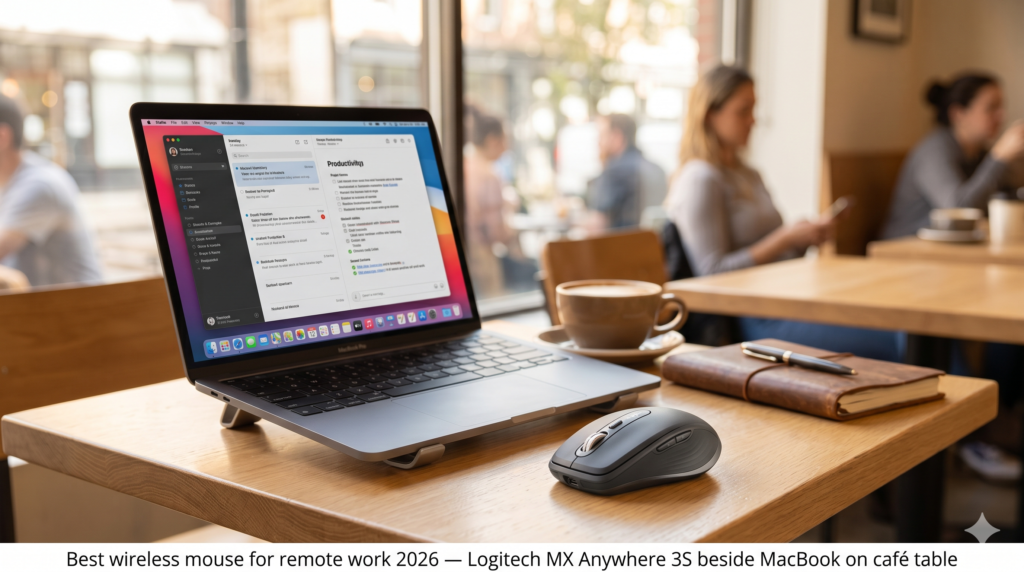
A laptop trackpad is a compromise. It’s good enough for casual navigation, but for eight hours of real work — editing documents, navigating large spreadsheets, scrubbing a video timeline, or pixel-precise design work — the imprecision and wrist strain of trackpad-only use compounds across the day into something that measurably slows you down. The best wireless mouse for remote work adds precision and ergonomic relief without adding cables, dongles, or meaningful bag weight. For nomads who work from a desk every day, it’s one of the highest-return peripheral investments in the entire kit.
This guide compares two wireless mice built for different ends of the nomad spectrum: the Logitech MX Anywhere 3S as the premium compact travel mouse, and the Logitech MX Vertical as the ergonomics-first alternative for nomads managing wrist strain.
At a Glance: Premium Compact vs. Ergonomic Alternative
| Feature | Logitech MX Anywhere 3S | Logitech MX Vertical |
|---|---|---|
| DPI Range | 200–8,000 | 400–4,000 |
| Connectivity | Bluetooth + USB receiver | Bluetooth + USB receiver |
| Battery Life | 70 days | 4 months |
| Weight | ~99g | ~135g |
| Scroll Wheel | MagSpeed electromagnetic | Standard |
| Ergonomic Angle | Standard | 57° vertical grip |
| Best Use Case | Travel precision, compact carry, all-surface tracking | Wrist strain prevention, long daily sessions |
| Price Tier | Premium | Budget |
🖱️ Premium Pick Logitech MX Anywhere 3S The MX Anywhere 3S is Logitech’s most refined compact travel mouse — 8,000 DPI tracking that works on any surface including glass, MagSpeed electromagnetic scrolling that handles long documents in a single flick, and 70 days of battery that makes charging a monthly rather than weekly concern. The honest drawback: at 99g it’s not the lightest mouse available, and the compact size can cause hand fatigue for users with larger hands during extended sessions. 👉 View Best Price on Amazon.ca
Logitech MX Anywhere 3S: Precision Engineering in a Travel-First Form Factor
Why 8,000 DPI and MagSpeed Scrolling Change Daily Productivity
Most wireless mice offer 1,600–3,200 DPI sensitivity — adequate for standard navigation but limiting for high-resolution display work and precise cursor placement. The MX Anywhere 3S’s 8,000 DPI ceiling isn’t about gaming speed — it’s about the ability to move precisely across a 4K portable monitor or a dual-screen setup without having to lift and reposition the mouse repeatedly. At higher DPI settings, small wrist movements translate to large, accurate cursor movements. At lower DPI settings, the same hardware provides fine control for detailed design or editing work. The full range means one mouse covers every precision requirement.
MagSpeed electromagnetic scrolling is the feature that separates the MX Anywhere 3S from every mouse at this price point. The scroll wheel operates in two modes: a ratchet mode with tactile clicks for line-by-line navigation, and a free-spin mode where the wheel decelerates smoothly over seconds rather than stopping immediately. In free-spin mode, a single flick scrolls through a 100-page document or a long codebase in one motion. The transition between modes is automatic based on scroll speed — flick fast and it switches to free-spin, scroll slowly and it returns to ratchet. Once you’ve used MagSpeed, standard scroll wheels feel like a step backwards.
The tracking system works on any surface — fabric, glass, marble, rough wood, polished metal — which matters specifically for nomads who work from unpredictable surfaces. A glass café table or a hotel desk with a reflective finish that defeats standard optical sensors doesn’t affect the MX Anywhere 3S.
Consistently rated 4.7★ across thousands of Amazon.ca reviews, with particular praise from developers, writers, and designers for scrolling performance and tracking precision.
Real-World Scenario: Long Writing Session, Co-Working Space, Tbilisi
A six-hour writing and editing day. The MX Anywhere 3S sits on the co-working space’s polished wood desk — a surface that defeats the office mouse you borrowed last week. Tracking is flawless. MagSpeed free-spin lets you navigate a 15,000-word document in two scroll flicks. The 8,000 DPI precision makes placing the cursor in the exact character position you need a single motion rather than a correction cycle. At the end of six hours your wrist is comfortable and your work is done.
Pros:
- 8,000 DPI tracks on any surface including glass and polished marble
- MagSpeed electromagnetic scrolling — the best scroll wheel in its class
- 70-day battery — one charge every two months in normal use
- Bluetooth + USB receiver — works with any laptop without pairing friction
- Quiet click switches — appropriate for library and quiet co-working environments
Cons:
- 99g is heavier than ultralight mice at comparable price
- Compact size can cause fatigue for large hands in extended sessions
- No vertical ergonomic option — standard horizontal grip only
| Score | Rating |
|---|---|
| Airport Usability | 5/5 |
| Portability | 5/5 |
| Setup Convenience | 5/5 |
| Value for Travel | 4.5/5 |
Logitech MX Vertical: When Wrist Health Is the Priority
The Ergonomic Case for a 57° Grip Angle
Standard horizontal mice require sustained forearm pronation — rotating your forearm inward so the back of your hand faces upward. Held for eight hours, this pronated position creates cumulative strain on the tendons and muscles of the forearm and wrist that manifests as the aching, burning sensation that nomads who work long daily hours often dismiss as an inevitable part of desk work. It isn’t inevitable — it’s a posture problem with a hardware solution.
The MX Vertical positions your hand at a 57° angle — closer to a natural handshake position — which eliminates the forearm pronation that causes the strain. Users transitioning from standard mice to the MX Vertical typically report noticeably reduced wrist and forearm discomfort within one to two weeks of consistent use. For nomads managing existing RSI symptoms or logging eight-plus hours of daily mouse use, this ergonomic shift is the functional reason to choose the Vertical over a more compact alternative.
The four-month battery life is the most practical specification on the sheet — you charge it roughly once per season, which for a nomad on a six-month trip means two charges for the entire journey. Standard 400–4,000 DPI tracking covers all productivity workflows without the extended high-DPI range of the Anywhere 3S, which is an acceptable trade for the ergonomic priority the Vertical delivers.
Consistently rated 4.5★ on Amazon.ca, with strong reviews from professionals managing RSI, wrist strain, and long daily computer sessions.
Real-World Scenario: Heavy Workload Week, Airbnb Desk, Lisbon
A deadline week. Eight to ten hours of daily mouse use across spreadsheet analysis, document editing, and video call management. By day three with a standard horizontal mouse, your forearm aches from the elbow to the wrist. With the MX Vertical, the 57° grip angle keeps the forearm in a neutral position throughout. By the end of the week your wrist is not the limiting factor on your productivity — your to-do list is.
Pros:
- 57° vertical grip eliminates forearm pronation — significant wrist strain reduction
- Four-month battery — charge it once per season on a long trip
- Bluetooth + USB receiver — same dual connectivity as MX Anywhere 3S
- Easy-switch button for pairing with up to three devices
- Well-established ergonomic design with years of user validation
Cons:
- 135g and larger form factor — not a compact travel mouse
- Takes 1–2 weeks to adapt — initial adjustment period affects productivity
- Standard scroll wheel — no MagSpeed free-spin
- Less precise DPI ceiling than the MX Anywhere 3S
| Score | Rating |
|---|---|
| Airport Usability | 3.5/5 |
| Portability | 3.5/5 |
| Setup Convenience | 4.5/5 |
| Value for Travel | 4.5/5 |
🖱️ Budget Pick Logitech MX Vertical For nomads logging eight-plus hours of daily mouse use and managing wrist or forearm strain, the MX Vertical is the most important peripheral upgrade you can make — not because it’s the most compact or feature-rich mouse, but because it prevents the cumulative physical cost that eventually makes long work sessions painful. If portability is your primary constraint, the Anywhere 3S is the correct choice. 👉 View Best Price on Amazon.ca
MX Anywhere 3S vs. MX Vertical: One Decision Point
The decision between these two mice is almost entirely determined by whether you’re managing wrist strain.
If your wrists feel fine after a full work day and your priority is the most capable, portable, precise mouse for a nomad setup, the MX Anywhere 3S is the correct choice. MagSpeed scrolling, 8,000 DPI any-surface tracking, and a 70-day battery in a 99g compact body is the best travel mouse specification available at this price point.
If you experience wrist or forearm discomfort during or after long work sessions — even mild aching that you’ve been ignoring — the MX Vertical’s ergonomic grip angle addresses the root cause rather than masking the symptom. The four-month battery and Bluetooth connectivity make it a viable travel peripheral despite its larger size — it’s the mouse you reach for when your wrist health determines your work output.
Best For…
- Writers, developers, and designers doing precise daily work: MX Anywhere 3S — MagSpeed scrolling and 8,000 DPI precision are the relevant specifications.
- Nomads with wrist strain, RSI, or long daily mouse sessions: MX Vertical — ergonomic grip angle is the only mouse feature that addresses the underlying cause.
- Ultralight one-bag packers: MX Anywhere 3S — 99g and compact form factor are as light as a capable mouse gets.
- Nomads with a fixed base for a month or longer: MX Vertical — the adaptation period is worth serving when you’re not moving every few days.
Who Each Product Is NOT For
The MX Anywhere 3S is not for nomads who are already experiencing significant wrist or forearm strain — precision and scrolling features don’t address the ergonomic root cause. The MX Vertical is not for nomads moving locations every two to three days who can’t afford the adaptation period disruption to their productivity.
Two Work Styles, Two Right Answers
Scenario: Freelance Developer, Three Locations Per Month
Moving frequently between cities. Laptop, hub, mouse, and headphones are the entire peripheral setup. The MX Anywhere 3S fits in the front pocket of a tech pouch, pairs in two seconds, and tracks on the café table’s polished surface without hesitation. MagSpeed lets you navigate large codebases in a single scroll motion. 70 days of battery means you’ve never had to charge it mid-trip.
Scenario: Remote Data Analyst, Monthly Base
Six weeks in Lisbon. Eight-hour work days, heavy spreadsheet analysis, significant daily mouse use. The MX Vertical sits on the Airbnb desk and the 57° grip angle removes the forearm ache that built up over the previous three months of horizontal mouse use. Productivity recovers within two weeks. By the end of the Lisbon stay, wrist discomfort is no longer part of the daily work experience.
If the MX Anywhere 3S sounds like the travel mouse your nomad setup needs, it’s available now on Amazon.ca — Logitech MX Anywhere 3S →
Final Summary: Best Wireless Mouse for Remote Work in 2026
| Product | Tier | Best For | |
|---|---|---|---|
| Logitech MX Anywhere 3S | Premium | Precision work, compact carry, any-surface tracking, frequent movers | View on Amazon.ca |
| Logitech MX Vertical | Budget | Wrist strain prevention, long daily sessions, fixed-base nomads | View on Amazon.ca |
The best wireless mouse for remote work in 2026 is the one matched to your daily work volume and your wrist health — not just the lightest or the most featured. The MX Anywhere 3S covers the precision and portability brief cleanly. The MX Vertical covers the ergonomic brief for nomads whose work volume demands it.
Both ship to Canada with Prime — and either one is a better daily driver than your MacBook trackpad for eight hours of professional work.
Your mouse is only part of the peripheral stack. Pair it with the best mechanical keyboard for digital nomads for a complete portable desk setup that rivals a fixed office. For keeping your mouse, cables, and hub organised and deployment-ready, the must-have travel gadgets guide covers the pouches and organisers that make it work. And for how the complete peripheral setup fits into a one-bag carry, the minimalist one-bag tech kit maps it all out.
Pingback: Best Mechanical Keyboard for Digital Nomads in 2026: Compact, Wireless, and Built to Travel - techtravelkit.com
Pingback: The E-Waste Trap: Why Your Travel Tech Is Built to Break - techtravelkit.com
Definitely consider that which you said. Your favorite reason seemed to be on the web the simplest factor to understand of. I say to you, I definitely get annoyed while other folks think about issues that they just don’t recognize about. You managed to hit the nail upon the top and also outlined out the whole thing without having side-effects , people can take a signal. Will probably be back to get more. Thank you