
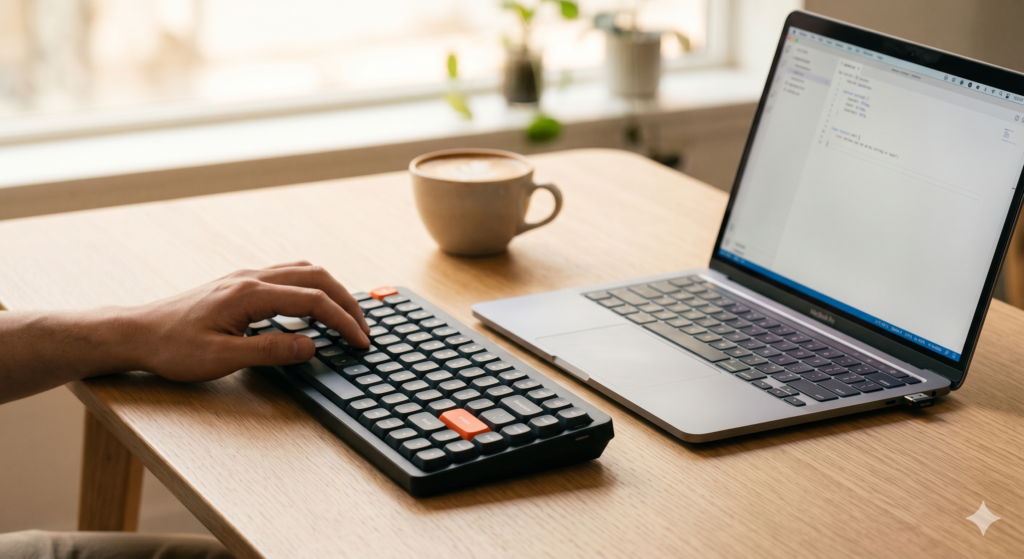
A MacBook keyboard is engineered for thinness, not feel. The key travel is shallow, the tactile feedback is minimal, and after a full day of writing or coding, the accumulated deficit of thousands of unsatisfying keystrokes translates into a kind of low-grade typing fatigue that you stop noticing only because it’s constant. The best mechanical keyboard for digital nomads changes that equation without changing your bag weight meaningfully — a compact wireless layout, real mechanical switches, and a battery that doesn’t need charging every other day makes the upgrade to a proper typing experience one of the highest-return decisions in a nomad peripheral setup.
This guide compares two keyboards at opposite ends of the travel-mechanical spectrum: the NuPhy Air75 as the premium ultra-slim wireless pick, and the Redragon K689 PRO as the affordable, full-featured budget alternative.
At a Glance: Premium Ultra-Slim vs. Budget Full-Featured
| Feature | NuPhy Air75 | Redragon K689 PRO |
|---|---|---|
| Layout | 75% compact | 75% compact |
| Switch Type | Low-profile mechanical | Full-height mechanical |
| Connectivity | Bluetooth 5.0 + 2.4GHz + USB-C | Bluetooth 5.0 + 2.4GHz + USB-C |
| Battery | 3,000mAh | 4,000mAh |
| Profile | Ultra-low (MacBook-like height) | Standard mechanical height |
| Hot-swap | Yes | Yes |
| Weight | ~598g | ~780g |
| Best Use Case | MacBook users, ultralight carry, flat profile | Budget entry, full mechanical feel, home-base setup |
| Price Tier | Premium | Budget |
⌨️ Premium Pick NuPhy Air75 Mechanical Keyboard The Air75 solves the core tension of travel mechanical keyboards — the conflict between genuine mechanical switch feel and the low profile that makes a keyboard practical to carry alongside a laptop. Its low-profile switches deliver tactile feedback and proper key travel at roughly half the height of standard mechanical switches, making it the only compact wireless keyboard that fits cleanly in a one-bag alongside a MacBook without adding structural bulk. The honest drawback: low-profile switches feel different from full-height switches — better than a laptop keyboard, but distinct from a traditional mechanical experience that full-height switch users expect. 👉 View Best Price on Amazon.ca
NuPhy Air75: The Engineering of a Low-Profile Mechanical Travel Keyboard
Why Low-Profile Switches Are the Travel-Specific Innovation That Changes the Category
Standard mechanical keyboard switches stand 4mm tall from the PCB surface. They produce excellent tactile and audible feedback, but they create a typing angle that requires a wrist rest for comfort, and they add meaningful height to a keyboard that already needs to travel alongside a laptop. NuPhy’s low-profile switches stand at 2.5mm — roughly 40% shorter than standard switches — which reduces total keyboard height to a profile close enough to a MacBook keyboard that your hands transition between the two without meaningful adaptation time.
This matters for nomads because it means the Air75 can sit beside or beneath a MacBook in a sleeve or tech pouch without the keyboard’s height creating a pressure point against the laptop lid. It also means no wrist rest is required for comfortable typing, which removes another item from the carry list. The typing angle is similar enough to the MacBook keyboard that switching between the two during a workday — using the MacBook keyboard on a plane, then the Air75 on a desk — doesn’t require recalibration.
Triple connectivity — Bluetooth 5.0 for up to three paired devices, 2.4GHz wireless via USB dongle for zero-latency input, and USB-C wired — covers every scenario. The device-switching key combination lets you toggle between your MacBook, iPad, and phone without re-pairing. The 3,000mAh battery runs for weeks of daily use on Bluetooth.
Hot-swappable switches mean you can replace individual switches if one fails or if you want to change the tactile profile — a repairability and customisation feature that significantly extends the keyboard’s useful life, which matters for a piece of gear you’re using daily across a year of travel.
Consistently rated 4.6★ across thousands of Amazon.ca reviews, with particular praise from MacBook users and one-bag travelers for the low profile and typing feel.
Real-World Scenario: All-Day Writing Session, Overnight Train, Japan
You’re writing from a fold-down tray table on an overnight train in Japan. Space is at a premium — the tray is narrow and your MacBook takes most of it. The Air75 sits at the same height as the MacBook keyboard, which means it fits on the remaining tray space without the keyboard height pushing your wrists upward at an uncomfortable angle. You type for four hours, produce 3,000 words, and your wrists are comfortable when you close the keyboard and slide it back into the bag beside the laptop.
Pros:
- Low-profile switches at MacBook-like height — no adaptation gap between keyboards
- Triple connectivity covers MacBook, iPad, and phone without re-pairing
- Hot-swappable switches for long-term repairability and customisation
- 75% compact layout retains arrow keys and function row
- Slim enough to travel alongside a MacBook without structural conflict
Cons:
- Low-profile switches feel distinctly different from full-height mechanical — not for traditional mechanical enthusiasts
- 598g is significant for a peripheral — measurable bag weight addition
- Higher price point than full-height alternatives
- Low-profile keycap availability is more limited than standard MX keycaps
| Score | Rating |
|---|---|
| Airport Usability | 4.5/5 |
| Portability | 4.5/5 |
| Setup Convenience | 5/5 |
| Value for Travel | 4/5 |
Redragon K689 PRO: Full Mechanical Feel at a Budget-First Price
Where Full-Height Switches Justify the Added Profile
The Redragon K689 PRO takes a different position: genuine full-height mechanical switches at a price that makes the upgrade from a laptop keyboard accessible without a significant budget commitment. For nomads who have used full-height mechanical keyboards and know the tactile and auditory experience they produce, the low-profile compromise of the Air75 is genuinely different — and the K689 PRO delivers the traditional mechanical experience at roughly half the price.
The 75% compact layout matches the Air75’s footprint — arrow keys and function row retained, numpad removed. The 4,000mAh battery outlasts the Air75 on paper, though real-world usage patterns make the difference less significant than the spec suggests. The same triple connectivity — Bluetooth 5.0, 2.4GHz, USB-C — covers the same multi-device pairing scenarios.
Hot-swap support matches the Air75’s repairability advantage, which is notable at this price point — most budget keyboards don’t offer switch replacement without soldering. The honest limitation is form factor: full-height switches mean a taller keyboard profile, which creates a more significant wrist angle without a rest and adds bulk when packing alongside a laptop.
Consistently rated 4.4★ on Amazon.ca, with strong reviews from mechanical keyboard enthusiasts entering the wireless compact category and budget-conscious nomads.
Real-World Scenario: Fixed-Base Month, Airbnb Desk, Chiang Mai
One month in a Chiang Mai Airbnb with a proper desk. The K689 PRO sits on the desk permanently — the setup doesn’t need to pack down daily. Full-height switches deliver the tactile feedback and audible click that makes long writing and coding sessions actively satisfying rather than merely functional. The 4,000mAh battery lasts three weeks without charging. For a fixed-base situation where portability is secondary to typing experience and value, the K689 PRO is the most sensible keyboard in the category.
Pros:
- Full-height mechanical switches — traditional tactile feel for mechanical enthusiasts
- 4,000mAh battery — longer runtime than the Air75
- Hot-swappable switches at a budget price point
- 75% layout retains full function row and arrow keys
- Significantly lower price than the Air75
Cons:
- Full switch height creates more wrist angle — wrist rest recommended for extended sessions
- Taller profile packs less cleanly alongside a laptop than the Air75
- Heavier at 780g
- Less refined build quality than the Air75 at this price
| Score | Rating |
|---|---|
| Airport Usability | 3.5/5 |
| Portability | 3.5/5 |
| Setup Convenience | 4.5/5 |
| Value for Travel | 5/5 |
⌨️ Budget Pick Redragon K689 PRO For nomads who want genuine full-height mechanical switch feel without spending premium prices, and whose travel pattern includes periods of fixed-base working where portability is secondary to the typing experience, the K689 PRO delivers real mechanical performance at a price that makes the upgrade straightforward. Just pack it with the expectation that it takes more bag space than the Air75. 👉 View Best Price on Amazon.ca
Air75 vs. K689 PRO: Switch Profile, Travel Pattern, and Budget
The decision framework has three variables: your switch preference, your movement frequency, and your budget.
If you move locations frequently and pack your keyboard daily alongside your laptop, the Air75’s low profile and lighter weight are practical advantages that compound every time you pack and unpack. The low-profile switch feel is meaningfully better than a laptop keyboard — which is the relevant comparison — even if it’s different from full-height mechanical.
If you’re staying in a location for two weeks or longer and the keyboard can live on a desk, the K689 PRO’s full-height mechanical experience and lower price make it the more satisfying typing choice for the cost. The portability trade-off becomes irrelevant when you’re not packing it every two days.
Best For…
- Frequent movers and one-bag purists: NuPhy Air75 — low profile, lighter, and travels cleanly alongside a MacBook.
- Fixed-base nomads and mechanical keyboard enthusiasts: Redragon K689 PRO — full switch height, better traditional mechanical feel, significantly lower price.
- MacBook users transitioning to an external keyboard: Air75 — low-profile switches minimise the adaptation gap between keyboards.
- Budget-conscious nomads at a fixed base: K689 PRO — full mechanical performance at a price that leaves budget for other kit.
Who Each Product Is NOT For
The Air75 is not for traditional mechanical keyboard enthusiasts who find low-profile switches unsatisfying — the different switch feel is a real and subjective preference that matters. The K689 PRO is not for nomads who pack daily and need their keyboard to fit alongside a laptop without adding structural bulk — the full switch height is a genuine packing constraint.
Two Typing Environments, Two Right Keyboards
Scenario: Content Creator, Three Cities Per Month
Bangkok, Bali, Lisbon — new location every three to four weeks. Daily pack and unpack. The Air75 slides alongside the MacBook in the laptop compartment of your one-bag. Low-profile switches deliver proper tactile feedback for a six-hour writing day. When you switch back to the MacBook keyboard for a quick café session, the height difference is small enough that your hands don’t notice. The keyboard earns its 598g across every typing session.
Scenario: Software Developer, Six Weeks Per Location
Six weeks in Medellín, six weeks in Tbilisi, six weeks in Porto. The K689 PRO lives on the Airbnb desk for the duration of each stay. Full-height switches deliver the mechanical typing experience that makes long coding sessions satisfying. When it’s time to move, it packs into the main compartment of your bag alongside clothes — not ideal, but manageable for a move that happens every six weeks rather than every three days.
If the NuPhy Air75 sounds like the keyboard your nomad setup needs, it’s available now on Amazon.ca — NuPhy Air75 Mechanical Keyboard →
Final Summary: Best Mechanical Keyboard for Digital Nomads
| Product | Tier | Best For | |
|---|---|---|---|
| NuPhy Air75 | Premium | Frequent movers, MacBook users, one-bag carry, low-profile preference | View on Amazon.ca |
| Redragon K689 PRO | Budget | Fixed-base nomads, mechanical enthusiasts, budget-first buyers | View on Amazon.ca |
The best mechanical keyboard for digital nomads is the one that matches your movement frequency and your switch preference — not just the most featured or the lightest available. Both of these keyboards are a meaningful upgrade over typing on a MacBook keyboard for eight hours a day. The Air75 earns it through portability and profile. The K689 PRO earns it through traditional mechanical feel and price.
Both ship to Canada with Prime — if you’re currently doing your best daily work on a laptop keyboard, either of these is the upgrade that changes how that work feels.
Complete your portable desk setup by pairing your new keyboard with the best wireless mouse for remote work — the two peripherals work together to turn any flat surface into a proper workstation. For the full picture of what a professional nomad peripheral setup looks like in 2026, the ultimate digital nomad gear guide covers every layer. And if you’re building a complete desk setup with a monitor, hub, and peripherals, the best USB-C hub guide covers the connectivity piece that ties it all together.
Pingback: The Airbnb Kitchen Chair Is Destroying Your Spine - techtravelkit.com