
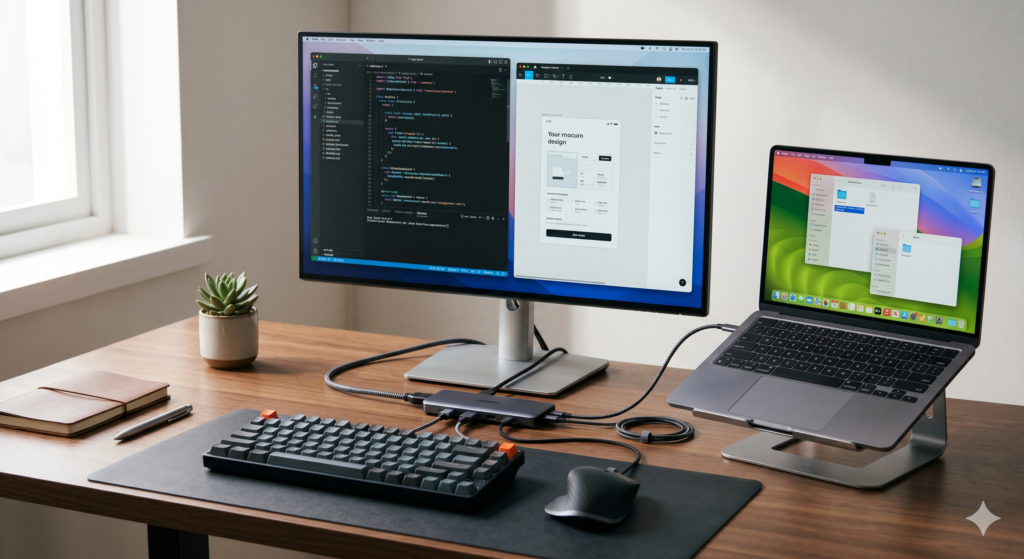
The modern nomad laptop is a masterpiece of restraint. Thin, light, powerful — and deliberately port-starved. Apple ships the MacBook Air with two USB-C ports and a headphone jack. That’s the entire connectivity story for a machine people use to run businesses. The moment you add a monitor, a wired keyboard, a USB-A drive, and an Ethernet cable, you’ve exceeded the port count before you’ve sat down. The best USB-C hub for digital nomads doesn’t just add ports — it turns a single USB-C connection into a complete desk setup and collapses back into a tech pouch in seconds when it’s time to move.
This guide compares two hubs that cover the full range of nomad connectivity needs: the UGREEN Revodok 7-in-1 as the premium full-featured pick, and the Anker 332 USB-C Hub 5-in-1 as the compact, reliable budget option.
At a Glance: Premium 7-in-1 vs. Budget 5-in-1
| Feature | UGREEN Revodok 7-in-1 | Anker 332 USB-C Hub 5-in-1 |
|---|---|---|
| Ports | HDMI, 3× USB-A, USB-C data, SD, microSD | HDMI, 2× USB-A, USB-C PD |
| HDMI Output | 4K@30Hz | 4K@30Hz |
| Power Delivery | 100W PD passthrough | 85W PD passthrough |
| Card Reader | SD + microSD | None |
| Cable | Integrated | Integrated |
| Weight | ~75g | ~53g |
| Best Use Case | Full desk setup, photographers, multi-device workflows | Basic port expansion, ultralight packers |
| Price Tier | Premium | Budget |
🔌 Premium Pick UGREEN Revodok 7-in-1 USB-C Hub The Revodok covers every connectivity scenario a nomad actually encounters — monitor, peripherals, card reader, and laptop charging — through a single USB-C connection that adds under 75g to your bag. The honest drawback: with all seven ports active simultaneously, heat builds up faster than with fewer ports in use, and sustained 4K display output alongside heavy USB-A transfers can cause occasional bandwidth throttling on older host devices. 👉 View Best Price on Amazon.ca
UGREEN Revodok 7-in-1: One Cable, Every Port You Need
Why Seven Ports Through One USB-C Connection Is an Engineering Challenge Worth Understanding
USB-C hubs don’t magically multiply bandwidth — they share it. A single USB-C 3.2 Gen 1 connection carries 5 Gbps of total data bandwidth, and every active port draws from that same pool. The Revodok’s engineering challenge — and its success — lies in how intelligently it manages that allocation. The HDMI output runs on a dedicated display protocol channel separate from the USB-A data ports, which means your monitor signal doesn’t compete with your USB-A transfer speeds. The 100W Power Delivery passthrough runs on the power delivery channel, which is entirely separate from data bandwidth.
The practical result: you can charge your MacBook at 100W, run a 4K monitor, transfer files from a USB-A drive, and read a memory card simultaneously without any of those operations meaningfully degrading another. That’s the real-world capability test that separates well-engineered hubs from cheap multi-port adapters that throttle everything the moment two ports are active.
The SD and microSD card reader slots are the features that justify the premium over a basic 5-in-1 hub for photographers and videographers. Ingest footage directly from your camera card to your laptop without a separate card reader — one less device, one less cable, one less item to forget on a hostel desk.
Consistently rated 4.6★ across thousands of Amazon.ca reviews, with particular praise from MacBook users and photographers for simultaneous port performance and build quality.
Real-World Scenario: Full Desk Setup, Co-Working Space, Barcelona
You arrive at your regular co-working space table. One USB-C cable connects the Revodok to your MacBook Air. The portable monitor plugs into HDMI — instant dual screen. Your mechanical keyboard connects via USB-A. Your mouse dongle takes the second USB-A. Your camera’s SD card slots into the reader for footage ingestion. Your MacBook charges at 85W through the PD passthrough. Five devices connected, one cable from the laptop, setup time under 90 seconds. Teardown is the same process in reverse.
Pros:
- 100W PD passthrough — full-speed laptop charging while all ports active
- Dedicated HDMI channel prevents display-data bandwidth conflict
- SD + microSD card reader built in — no separate reader needed
- 75g — adds almost nothing to bag weight
- Supports MacBook Air, MacBook Pro, and all USB-C Windows laptops
Cons:
- Heat accumulation with all 7 ports active simultaneously
- 4K@30Hz HDMI — not suitable for 60Hz monitor workflows
- USB-C data port and USB-A ports share bandwidth under heavy simultaneous load
| Score | Rating |
|---|---|
| Airport Usability | 5/5 |
| Portability | 5/5 |
| Setup Convenience | 5/5 |
| Value for Travel | 4.5/5 |
Anker 332 USB-C Hub 5-in-1: Clean, Light, and Built for Everyday Expansion
Where Five Ports Is Exactly Enough
The Anker 332 takes a simpler approach and executes it reliably. Five ports — HDMI, two USB-A, one USB-C data, and 85W PD passthrough — cover the fundamental connectivity needs of most nomads without the additional complexity and heat management requirements of a seven-port design. For travelers whose daily setup is a monitor, a USB-A peripheral, and laptop charging, the 332 provides everything necessary at a price and weight that make it a genuine zero-friction carry.
Anker’s build quality is consistent and well-established. The hub’s integrated cable is short and tidy — no loose cable to manage, no separate connection to forget. The 85W PD passthrough charges most laptops at full speed, including MacBook Air. The HDMI output matches the Revodok at 4K@30Hz, which is the standard ceiling for single-cable USB-C hub display output regardless of price.
The honest limitation is what’s absent rather than what’s present. No card reader means photographers and videographers need a separate device. Two USB-A ports covers keyboard and mouse but leaves no room for a USB-A drive without unplugging a peripheral. For workflows that stay within those constraints, the 332 is a clean, no-drama solution.
Consistently rated 4.5★ on Amazon.ca, with strong reviews from MacBook users and students for reliability and value.
Real-World Scenario: Hotel Room Setup, Overnight Business Trip, Singapore
One night in Singapore before a client presentation. You pull the Anker 332 from your tech pouch, connect it to your MacBook Pro, plug the hotel TV into the HDMI port to review your deck on a large screen, connect your USB-A presentation clicker, and charge the laptop at 85W. Three devices, one hub, five minutes to set up a functional presentation review environment in a hotel room. Pack it back into the pouch the next morning — it takes up less space than a granola bar.
Pros:
- 85W PD passthrough covers MacBook Air and most ultrabooks at full speed
- Clean integrated cable — no loose connectors
- Two USB-A ports covers keyboard + mouse simultaneously
- 53g — the lightest capable hub for standard nomad connectivity
- Reliable Anker build quality and warranty support
Cons:
- No SD or microSD card reader
- Two USB-A ports is limiting for workflows requiring a third USB-A device
- No USB-C data port beyond PD passthrough
| Score | Rating |
|---|---|
| Airport Usability | 5/5 |
| Portability | 5/5 |
| Setup Convenience | 5/5 |
| Value for Travel | 5/5 |
🔌 Budget Pick Anker 332 USB-C Hub 5-in-1 For nomads who need clean, reliable port expansion without card reading or complex multi-device workflows, the Anker 332 is the most sensible carry in the category — light enough to forget it’s in your bag, reliable enough to trust at a client presentation, and priced well below what its quality suggests. If you need a card reader, step up to the Revodok. 👉 View Best Price on Amazon.ca
Revodok vs. Anker 332: Matching the Hub to Your Actual Workflow
The decision comes down to two questions: do you read camera cards, and how many USB-A devices do you run simultaneously?
If you’re a photographer or videographer who ingests footage in the field, the Revodok’s dual card reader slots make it the clear choice — carrying a separate card reader adds a device, a cable, and another item to track. If your USB-A needs extend to three or more simultaneous devices — keyboard, mouse, and a USB-A drive at the same time — the Revodok’s three USB-A ports cover that scenario where the 332 doesn’t.
For every other workflow, the Anker 332 provides the same monitor output, the same PD passthrough, and the same USB-A peripheral support at lower cost and weight. The gap in real-world daily performance for standard nomad use is minimal.
Best For…
- Photographers and videographers: UGREEN Revodok 7-in-1 — built-in card reader eliminates a separate device entirely.
- Writers, developers, and standard remote workers: Anker 332 — covers monitor, keyboard, mouse, and charging cleanly.
- MacBook Air users: Both work identically — the Air’s two USB-C ports mean one goes to the hub, one stays free for a second monitor or second hub.
- Ultralight one-bag packers: Anker 332 — 53g is as light as a capable hub gets.
Who Each Product Is NOT For
The Revodok is not for travelers who only need one or two additional ports — the extra complexity and heat generation aren’t justified for minimal connectivity needs. The Anker 332 is not for photographers or anyone who needs simultaneous three-device USB-A connectivity — the port count is a hard limit.
Two Setups, One Cable Each
Scenario: Photography Trip, Lisbon
You shoot 200 photos daily on a mirrorless camera. Each evening at your Airbnb, the Revodok connects to your MacBook Air via one USB-C cable. SD card slots in, Lightroom ingests 200 RAW files while the portable monitor shows your editing workspace and the laptop charges at 85W. No card reader to pack separately. No USB-C adapter for the monitor. One hub handles the entire evening workflow.
Scenario: Remote Consulting, Client Office Visit, Amsterdam
You’re presenting at a client’s office and need to connect to their conference room monitor. The Anker 332 plugs into your MacBook Pro, HDMI connects to the conference room display, your USB-A presentation remote connects to a USB-A port, and the laptop charges from the room’s USB-C outlet through the PD passthrough. Total additional gear: one hub the size of a USB stick. Professional setup in under two minutes.
If the UGREEN Revodok 7-in-1 sounds like the connectivity upgrade your nomad setup needs, it’s available now on Amazon.ca — UGREEN Revodok 7-in-1 →
Final Summary: Best USB-C Hub for Digital Nomads
| Product | Tier | Best For | |
|---|---|---|---|
| UGREEN Revodok 7-in-1 | Premium | Photographers, full desk setups, multi-peripheral workflows, card readers | View on Amazon.ca |
| Anker 332 USB-C Hub 5-in-1 | Budget | Standard remote work, monitor + peripherals, ultralight carry | View on Amazon.ca |
The best USB-C hub for digital nomads is the one that closes your specific connectivity gap without adding unnecessary weight or complexity. The Revodok covers the full spectrum. The Anker 332 covers the essentials. Both turn a port-limited laptop into a complete desk setup through a single cable.
Both ship to Canada with Prime — if you’re currently managing a tangle of individual adapters for each missing port, a single hub simplifies that entire ecosystem in one purchase.
Pair your hub with a portable monitor to complete the dual-screen setup the hub enables. For keeping the hub, cables, and adapters organised and ready to deploy, the must-have travel gadgets guide covers the organisers that make it happen. And if you’re building the complete nomad peripheral stack — hub, keyboard, mouse, and stand — the ultimate digital nomad gear guide maps out every component.
Pingback: The Airbnb Kitchen Chair Is Destroying Your Spine - techtravelkit.com