
I’ve repacked my bag more times than I can count. I’ve bought gear that sounded perfect in a review and arrived broken at a hostel in Bangkok. I’ve also discovered products mid-trip that quietly changed how my whole setup worked — the kind of discovery that makes you wish you’d known six months earlier.
This guide is the version of that conversation I wish someone had given me before my first long-term remote work trip. It’s not every piece of gear ever made for digital nomads. It’s the specific categories that actually matter, the products I’d buy from my own wallet today, and the honest reasons why.
Everything here is available on Amazon.ca. Every link is real. Nothing is on here because someone paid for the placement.
The Laptop Decision: Get This Right First
Everything else in your bag supports the laptop. If you get this wrong, no amount of accessories fixes it.
My honest take in 2026 is that this decision comes down to one question: do you run sustained heavy workloads — video exports, compilations, large dataset processing — or do you spend your day in Google Workspace, a browser, and video calls?
If it’s the second, the Apple MacBook Air M5 is the correct answer. 1.24kg, fanless, 18 hours of real battery life, and fast enough for everything standard professional work demands. I’ve watched colleagues on heavier machines slowly accumulate resentment for their laptops on long trips. The Air M5 quietly removes that. The one caveat: it throttles under sustained heavy CPU load because there’s no fan to manage heat. For most people, that scenario never actually happens.
If you’re editing video, compiling code, or running local AI models regularly, the Apple MacBook Pro 14″ M5 Pro is worth the extra weight and cost. Active cooling means it never throttles. The XDR display is the best screen you’ll find in this form factor. Native HDMI and SD card ports remove the need for a hub entirely. At 1.62kg it’s 380g heavier than the Air — which you’ll notice after three months of daily carry, but which is entirely justified if your income depends on sustained output speed.
👉 MacBook Air M5 on Amazon.ca | MacBook Pro M5 Pro on Amazon.ca
Power: The Category That Ruins More Trips Than Any Other
I’ve sat in enough airports watching people rotate a single underpowered charger between three devices to know that most nomads under-invest in power. It’s also the category where getting it right costs the least effort.
The Charger
GaN chargers replaced silicon chargers for a simple reason: they generate dramatically less heat at equivalent wattage, which means they’re smaller, lighter, and more efficient. Three options depending on your setup:
The Anker Prime 100W GaN Wall Charger is what I’d buy if I could only have one charger. Three ports, 100W ceiling, dynamic power distribution across all devices simultaneously. It handles a MacBook Pro at full speed while charging my phone and headphones in parallel. The one honest drawback is the 195g weight — heavier than its competitors, justified by the output.
For MacBook Air users or anyone running a lighter device stack, the Anker 735 GaNPrime 65W is the smarter carry. 110g, three ports, full-speed charging for any ultrabook. I used this as my only charger for four months and never once wished for more wattage.
If you need serious multi-device output and budget is less of a concern, the Satechi 165W USB-C GaN Charger is the option that covers every device in a professional setup simultaneously — laptop, monitor, power bank, phone, earbuds. Heavy, but the output is transformative.
👉 Anker Prime 100W | Anker 735 65W | Satechi 165W
The Power Bank
Two scenarios determine your power bank choice.
First scenario: you need to charge a laptop away from outlets. The Anker 737 PowerCore 24K is the answer. 140W output, 24,000mAh, real-time display showing wattage and remaining runtime. It fully charges a MacBook Pro and still has capacity left for your phone and earbuds. Check airline regulations before packing — high-capacity banks require carry-on placement and some carriers have watt-hour restrictions.
Second scenario: you need a phone and earbuds topped up throughout the day without carrying significant weight. The INIU 10,000mAh Slim disappears into a jacket pocket and gives most iPhones two and a half full charges. At 204g it’s genuinely forgettable to carry.
👉 Anker 737 PowerCore 24K | INIU 10,000mAh
The Cable
This sounds like the most boring item on the list. It isn’t. A bad USB-C cable at the wrong moment has caused me more genuine stress than almost any other gear failure. The Anker 100W USB-C Cable is rated for the full 100W throughput that your charger and power bank are capable of — most cheap cables cap at 60W and you’d never know unless you tested it. I carry two. One stays in the bag permanently.
Network Security: Stop Connecting Directly to Hotel WiFi
This is the category most nomads skip until something goes wrong. Hotel WiFi, café networks, and coworking space connections are open broadcast environments. Every device you own is potentially visible to anyone else on the network. In three years of nomadic work I’ve had one security incident — a credential harvesting attempt at a hostel in Eastern Europe. I now travel with a router. I haven’t had one since.
The GL.iNet GL-AXT1800 Slate AX is the premium choice for nomads whose work involves sensitive client data or corporate network access. WiFi 6, WireGuard VPN support that maintains 120+ Mbps while fully encrypted, built-in ad blocking, and Ethernet input for Airbnbs with wired connections. It runs warm under sustained VPN load — the honest limitation — but it’s the only travel router I’ve found that doesn’t make a VPN connection feel like a punishment.
For lighter use — primarily bypassing hotel device limits and getting a basic private network — the GL.iNet GL-SFT1200 weighs 72g, draws power from a USB port, and sets up in four minutes. VPN speeds are limited by the processor, but for casual privacy and device consolidation it’s entirely adequate and costs a fraction of the Slate AX.
👉 GL.iNet Slate AX | GL.iNet GL-SFT1200
Audio: The Gear That Controls Your Focus Bubble
The ability to create silence on demand is one of the most underrated productivity tools a nomad can carry. A packed café in Medellín or a noisy coworking space in Chiang Mai becomes workable the moment a good ANC system goes on.
I’ve written a full comparison of the best noise-cancelling headphones for long-haul flights that covers this category in detail. The short version: the Sony WH-1000XM5 remains the benchmark for over-ear ANC — 30-hour battery, dual-processor noise cancellation that genuinely erases engine frequencies, and the Auto NC Optimizer that adapts to cabin pressure in real time. The earcup case is bulky. Everything else about it is not.
Ergonomics: The Category You Ignore Until Your Back Forces You Not To
I ignored ergonomics for my first eight months of nomadic work. Then I spent two weeks in Tbilisi at a kitchen table that was the wrong height and left with neck pain that took three weeks to resolve. Now ergonomics is the first category I sort when I arrive somewhere new.
The MOFT Laptop Stand is the most elegant solution I’ve found. It sticks to the bottom of your laptop with a reusable adhesive, adds essentially zero bulk, and folds out to provide a 15 or 25-degree typing angle. It’s not a full eye-level stand — for that you need something taller — but for café tables and hotel desks where the angle matters more than the height, it’s the best option in its weight class.
For mouse work, the Logitech MX Anywhere 3S is what I’d pick if I were starting from scratch. 8,000 DPI tracking that works on any surface including glass, MagSpeed electromagnetic scrolling that makes navigating long documents feel like a completely different activity, and 70 days of battery. I’ve had mine for over a year and I’ve charged it four times.
👉 MOFT Laptop Stand | Logitech MX Anywhere 3S
Storage and Data: What Happens When You Lose Everything
I’ve met nomads who’ve lost laptops, had drives fail, and lost months of work because their backup strategy was “I’ll sort that out eventually.” Don’t be that person. The solution is simple and cheap relative to what you’re protecting.
The Samsung T9 Portable SSD is my current daily backup drive. 2,000 MB/s read speed over USB 3.2 Gen 2×2, IP65-rated enclosure, and 3-metre drop resistance. I back up every evening. The transfer takes seconds not minutes because the speed is genuinely NVMe-class. The IP65 rating has survived rain, salt spray, and the accumulated humidity of working in Southeast Asia for four months.
Organisation: The Category That Saves an Hour Per Week
Loose cables in a backpack don’t just look chaotic — they damage ports, tangle around each other, and mean you spend real time every morning hunting for the right cable. The solution costs under $40 and takes ten minutes to set up once.
The Bagsmart Electronic Organizer holds cables, adapters, a power bank, a hard drive, and a charger in an organised flat pouch that opens fully for instant access. Everything has a place. You can find anything in under ten seconds. I’ve used various organisers over three years and this one has the best balance of capacity, accessibility, and pack size.
The Peak Design Tech Pouch is the premium alternative — weatherproof, expandable, with an origami-style internal layout that provides dedicated slots for everything. More expensive, more capable, and built to last significantly longer. If you’re going to carry one organiser for years, the Peak Design is the one worth the investment.
👉 Bagsmart Electronic Organizer | Peak Design Tech Pouch
Physical Security: Because Gear Gets Stolen
The Apple AirTag 4-Pack is the single highest-return security investment a nomad can make. One in your laptop bag. One in your checked luggage if you check bags. One on your keychain. One inside your tech pouch. The Find My network means any iPhone within Bluetooth range silently relays the location of every tagged item to your iCloud account — in Canada and most major cities, that creates near-real-time location updates. I’ve used mine to locate a bag left at a train station and to confirm my checked luggage arrived before I left the airport. Both situations resolved in under two minutes.
The Full Kit — Everything in One Place
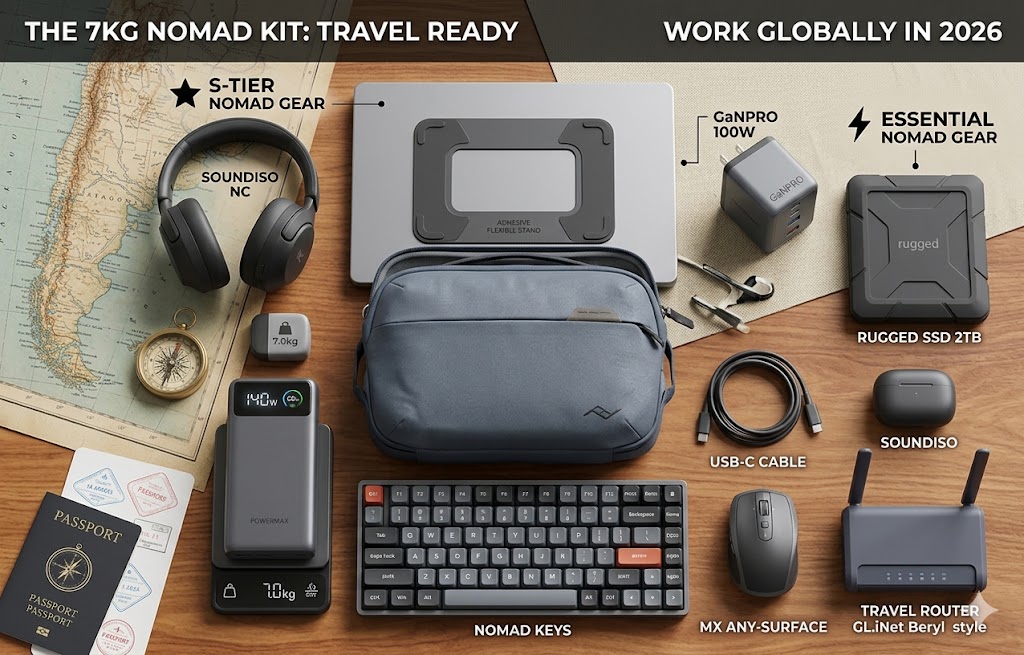
Here’s the complete gear stack referenced in this guide:
The right digital nomad gear isn’t the most expensive stack — it’s the one matched to your actual workload, your travel frequency, and your bag weight tolerance. All of the above ship to Canada with Prime.
Every category in this guide has a dedicated deep-dive post if you want the full comparison before buying. The best GaN charger guide covers the full charger comparison including the UGREEN Nexode. The best travel router guide covers the GL.iNet lineup in full technical detail. The MacBook Air M5 vs MacBook Pro M5 comparison covers the laptop decision in the depth it actually deserves — including the thermal throttling question that most people don’t know to ask until they’ve made the wrong choice.
Pingback: Rugged NVMe vs. Standard SSD: Why Your Drive Choice Matters in the Humid Tropics - techtravelkit.com
Pingback: Best Smartwatch for Travel in 2026: GPS, Safety, and Battery That Actually Lasts - techtravelkit.com
Pingback: Best Smartwatch for Hiking and Camping in 2026: GPS, Safety, and Battery That Lasts - techtravelkit.com
Pingback: iPhone 18 Pro and Pro Max: Everything We Know About Apple’s Upcoming iPhone - techtravelkit.com
Hi there! This post couldn’t be written any better! Reading this post reminds me of my old room mate! He always kept talking about this. I will forward this page to him. Fairly certain he will have a good read. Many thanks for sharing!