
The laptop I’ve wanted to exist since I started working remotely has been the same laptop since 2021: light enough to carry daily, fast enough to handle serious workloads, and built in a way that means a single component failure doesn’t end your work for three weeks while you wait for a manufacturer repair.
Three laptops later — two MacBook Pros and a Dell XPS 13 that had its SSD fail in a guesthouse in Hanoi with no nearby repair options — I’m still carrying the same design philosophy problem. The machines have gotten faster. They haven’t gotten more repairable.
The Framework Laptop 13 Pro changes that calculation. Not perfectly, not without trade-offs, but in the specific ways that matter most for nomads who treat their laptop as infrastructure rather than a consumer product.
This post covers what the Framework 13 Pro actually is, what the 2026 specs mean in real travel terms, and — specifically — which companion components from Amazon.ca are worth pairing with it when you build the DIY Edition.
What the Framework 13 Pro Actually Is — And Why It’s Different
Framework is not a brand trying to compete with Apple on thinness or with Dell on mass-market appeal. It’s a company that made a specific bet: that a meaningful number of people want a laptop they can repair, upgrade, and maintain for a decade rather than replace every two to three years.
The Framework 13 Pro is their clearest statement of that bet. Here’s what it delivers that no other 13-inch laptop currently offers:
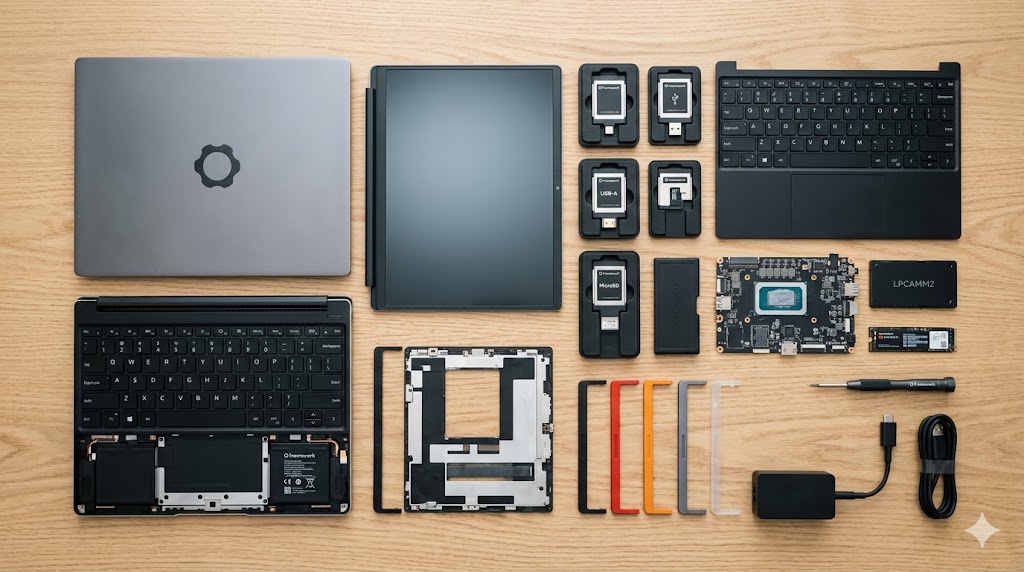
Every component is user-replaceable with the included screwdriver. Keyboard. Screen. Battery. Ports. RAM. SSD. Not theoretically replaceable in a way that voids a warranty — intentionally designed for user replacement, with replacement parts available directly from Framework. The keyboard is a magnetic module that removes with no screws. The ports are hot-swappable expansion cards that slot in from the sides. The SSD is a standard M.2 slot accessible in under ten minutes.
The port system is genuinely clever. Six expansion card slots — three per side — accept USB-C, USB-A, HDMI, DisplayPort, SD card, Ethernet, or storage expansion cards. You configure the ports for the trip. Flying to a country where every projector uses HDMI? Swap two USB-C cards for HDMI. Spending a month working from Airbnbs with Ethernet? Add one. The laptop’s port configuration changes with your working context rather than forcing you to carry adapters for every scenario.
The 2026 Spec Sheet — What Each Number Means in Travel Terms
| Specification | Framework 13 Pro | Why It Matters On the Road |
|---|---|---|
| Processor | Intel Core Ultra 3 “Panther Lake” or AMD Ryzen AI 300 | 2nm node manufacturing generates less heat — sustained performance in non-air-conditioned environments |
| Display | 13.5″ 2.8K 120Hz touchscreen | 120Hz makes scrolling and cursor movement noticeably smoother across 8-hour sessions |
| Brightness | 700 nits | Outdoor café and patio work is actually viable — most laptops at 300–400 nits aren’t |
| Chassis | CNC-machined aerospace aluminium | No keyboard flex when the laptop is squeezed in a packed bag — one of the main structural failure modes in cheaper chassis |
| Weight | 1.4kg | Clears budget airline carry-on limits with room for the rest of the kit |
| Battery | 74Wh | Long-haul flight capable on a single charge — no power bank dependency for most routes |
| RAM | Swappable LPCAMM2 | Upgrade memory later without replacing the motherboard — a design decision that’s rare and valuable |
| Power input | 100W USB-C PD | Full-speed charge from any 100W GaN charger — no proprietary charging brick required |
The 700-nit brightness is the specification that most reviews gloss over and that most nomads underestimate until they’ve tried to work from a window-adjacent café table with a 300-nit screen. 700 nits in direct sunlight is the threshold where the display becomes genuinely usable rather than a dark mirror. For nomads who work from outdoor spaces, this isn’t a luxury spec — it’s the threshold between a workable setup and an unusable one.
The Panther Lake and Ryzen AI 300 chip options both use 2nm manufacturing. The practical implication: less heat generated per computation cycle, which means less thermal throttling in the high-ambient-temperature environments that nomads work in regularly. A non-air-conditioned café in Bangkok in August is a genuinely challenging thermal environment for a laptop. Both chip options handle it better than their predecessors.
The Component Build: What to Source on Amazon.ca
The Framework 13 Pro DIY Edition ships as a bare chassis. You supply the SSD and — depending on configuration — the RAM. This is where the real customisation happens, and where Amazon.ca sourcing makes the build meaningfully cheaper than Framework’s own component bundles.
Here’s what I’d put in the build at each budget point, with honest reasons for each choice.
Internal Storage: The Two Options Worth Considering
The Framework’s M.2 NVMe slot accepts any PCIe 4.0 drive. Two from the verified database cover the full price spectrum.
WD_BLACK 2TB SN850X NVMe — The Premium Build Storage
The WD_BLACK SN850X is the drive I’d put in a Framework if I were building it for video production or heavy creative work. At 7,300 MB/s sequential read over PCIe 4.0, it’s one of the fastest consumer NVMe drives available — fast enough to scrub 4K ProRes footage directly from the drive without proxy files, fast enough to run VM environments without noticeable latency, fast enough that transfer operations that would take three minutes on a mid-range drive take under 30 seconds.
The 2TB capacity is the other argument for this drive. At 2TB you can carry your entire working project library, a full operating system, a Windows VM partition, and a substantial media library without managing storage. For nomads who’ve spent time rationing gigabytes across multiple drives, the cognitive overhead reduction of having everything in one place is significant.
The SN850X also includes a built-in thermal sensor that the Framework’s cooling system can query — allowing the thermal management to account for drive temperature as well as CPU temperature in sustained high-load scenarios.
Rated 4.7★ on Amazon.ca — consistently praised by developers and video editors for sustained read/write performance under heavy workloads.
👉 WD_BLACK 2TB SN850X NVMe on Amazon.ca
Crucial P3 Plus 1TB PCIe 4.0 — The Budget Build Storage
For nomads whose work is primarily cloud-based — Google Workspace, browser-based tools, code that lives in remote repositories, documents that sync to cloud storage — 1TB at lower cost is the honest right-sized answer. The Crucial P3 Plus reads at up to 5,000 MB/s sequential over PCIe 4.0, which covers every standard productivity workflow without perceptible latency.
At 1TB you store your operating system, your working files, your applications, and a reasonable local backup without drama. What you don’t store: large media libraries, multiple VM environments, or offline video archives. For most nomads who use cloud storage as their primary file layer, that’s the right constraint.
The Crucial is significantly cheaper than the WD_BLACK — the savings fund a meaningful portion of another component in the build.
Rated 4.5★ on Amazon.ca — strong reviews from standard productivity users and developers for reliable performance at the price point.
👉 Crucial P3 Plus 1TB PCIe 4.0 on Amazon.ca
Power Delivery: The 74Wh Battery Needs a Serious Charger
The Framework 13 Pro’s 74Wh battery charges at up to 100W USB-C PD. That means the charger you pair with it determines whether you’re charging at full speed or at reduced speed — and on a short layover or a café session with a deadline, that gap matters.
Anker Prime 100W GaN — The Premium Charger
The Anker Prime’s ActiveShield 2.0 thermal monitoring is the feature that makes it the correct charger for a Framework specifically. Framework laptops running at full performance in hot environments generate heat from both the CPU and the NVMe drive simultaneously — the charger is adding to that thermal load. A charger that throttles its own output to protect itself in high-ambient temperatures (which cheaper GaN chargers do silently) reduces your effective charging speed exactly when you need maximum speed most.
ActiveShield 2.0 monitors the Prime’s internal temperature over two million times per day and adjusts power delivery to maintain consistent output without thermal throttling. In a Bangkok café at 34°C ambient, the Prime delivers the same 100W it delivers at a Montréal café at 20°C. That consistency is worth the premium for a laptop that maxes out its charging ceiling at 100W.
Three ports — 100W primary USB-C, secondary USB-C, USB-A — handle the Framework, a phone, and earbuds simultaneously from one outlet. For nomads working from locations with limited outlet access, that single-outlet capability is the operational feature that justifies the charger’s footprint.
Rated 4.8★ on Amazon.ca — the most consistently reviewed GaN charger in the 100W class.
👉 Anker Prime 100W GaN on Amazon.ca
UGREEN 100W Nexode — The Mid-Range Charger
The UGREEN Nexode delivers 100W at a lower price than the Anker Prime with one additional USB-C port — four total ports including three USB-C and one USB-A. For a Framework user running a more complex device stack — laptop, phone, earbuds, and a power bank all charging simultaneously — that fourth port removes the last rotation exercise from a charging session.
UGREEN’s GaN II technology is efficient and well-managed across standard ambient temperatures. The honest difference from the Anker Prime surfaces in high-heat environments where the Nexode’s thermal management is less aggressive — it throttles slightly earlier than the Prime in genuinely hot conditions. For most nomads working in temperature-controlled coworking spaces and cafés, this distinction is invisible. For nomads working regularly in hot, humid, non-air-conditioned environments — the Anker Prime’s consistency is worth the price difference.
Rated 4.6★ on Amazon.ca — strong reviews from MacBook and Windows laptop users for the four-port configuration and competitive price.
👉 UGREEN 100W Nexode on Amazon.ca
Protective Sleeve: CNC Aluminium Still Needs Transit Protection
The Framework’s CNC aluminium chassis is structurally rigid — it won’t flex under bag pressure the way cheaper laptop bodies do. But aluminium scratches and dents under impact, and the screen assembly — despite its durability — is still a glass panel that responds poorly to sharp objects sharing bag space.
tomtoc 360 Protective Sleeve — The Transit Protection Pick
The tomtoc 360’s corner armour system is the feature that makes it the correct sleeve for active travel. The corner of a laptop lid is the specific structural point that absorbs impact first when a bag is dropped or thrown into overhead storage — and it’s the point that standard padded sleeves provide the least protection. tomtoc’s reinforced corner guards redirect impact energy away from the display assembly corners where screen cracks originate.
Water-resistant exterior handles rain, ambient humidity, and the condensation that builds on cold surfaces in hot humid environments — a common occurrence when a laptop bag moves between air-conditioned transport and outdoor heat. The integrated front accessory pocket carries a GaN charger, a USB-C hub, and two cables alongside the laptop without requiring a separate tech pouch.
Rated 4.7★ on Amazon.ca — consistently praised for impact protection and the YKK zipper quality that doesn’t jam under load.
👉 tomtoc 360 Protective Sleeve on Amazon.ca
Native Union Ultralight Sleeve — For Weight-Constrained Builds
For nomads operating under strict weight limits where every gram is deliberate, the Native Union Ultralight at ~120g is the honest alternative. Slim felt construction provides surface scratch protection and key-contact prevention — the two most common damage modes for laptop lids in bags where the laptop travels in a dedicated padded compartment. It doesn’t provide corner armour, impact absorption, or water resistance.
The correct context for the Ultralight: your bag has a dedicated padded laptop compartment that handles external impact, and the sleeve’s job is interior surface protection rather than structural crash protection. In that scenario — which describes most quality travel backpacks — the Ultralight is sufficient and meaningfully lighter than the tomtoc.
Rated 4.4★ on Amazon.ca — praised by minimalist travelers and one-bag purists for the slim profile and professional aesthetics.
👉 Native Union Ultralight Sleeve on Amazon.ca
The OCuLink Story — Why the Framework 16 Matters for Power Users
I want to mention the Framework 16’s OCuLink Dev Kit because it’s one of the more interesting announcements for nomads with a fixed home base.
OCuLink is a high-bandwidth connection protocol — similar in concept to Thunderbolt but with significantly higher bandwidth ceiling — that allows connection of an external GPU enclosure with near-zero performance penalty. The implication for a specific type of nomad: you keep a desktop GPU enclosure at a home base, plug in via OCuLink when you’re there, and have a machine that performs comparably to a desktop workstation for rendering, machine learning, or GPU-accelerated computation. When you travel, you unplug and carry the laptop alone.
For video producers, 3D artists, and ML practitioners who currently maintain both a travel laptop and a desktop machine — this collapses that into one device. It won’t suit every nomad. For the specific person running GPU-heavy workloads who also travels frequently, it’s the most compelling hybrid computing announcement in years.
Who the Framework 13 Pro Is Actually For — And Who It Isn’t
The Framework is not the right laptop for everyone. I want to be honest about this because the right-to-repair enthusiasm around Framework can obscure the genuine trade-offs.
The Framework 13 Pro IS for:
- Nomads whose previous laptops have failed and who’ve experienced the specific pain of a non-repairable machine failing remotely
- Anyone planning to keep their laptop for 4+ years and wanting to upgrade components over time
- Windows-first nomads who want the closest thing to MacBook build quality with full repairability
- Developers and power users who want to configure their exact port layout per trip
- Nomads who work in harsh thermal environments and need sustained chip performance
The Framework 13 Pro IS NOT for:
- MacBook ecosystem users — Apple Intelligence, Handoff, AirDrop, and the deep iPhone/iPad/Watch integration don’t translate to Framework. If your entire stack is Apple, the ecosystem loss is real and significant
- Anyone prioritising absolute minimum weight — at 1.4kg the Framework is comparable to a MacBook Air M5, but the MacBook Air’s fanless silent operation and 18-hour battery life currently exceed what Framework offers on those specific metrics
- Nomads who never repair or upgrade hardware and just replace when something fails — the repairability premium isn’t valuable if you’re never going to use it
- Anyone needing macOS software — specific tools with macOS-only versions remain a real constraint
Verdict: Is the Framework 13 Pro Worth It for Nomads?
The honest answer is: it depends on which specific failure you’ve experienced.
If you’ve never had a laptop fail remotely, the MacBook Air M5 remains the easier, lighter, more ecosystem-integrated choice for most nomads. The battery life, the silence, the M5 chip efficiency, and the Apple ecosystem integration are real advantages that the Framework doesn’t match.
If you’ve had a laptop fail remotely — or if you’re philosophically committed to owning hardware rather than renting it from a manufacturer’s service schedule — the Framework 13 Pro is the most compelling repairable laptop that has ever existed. The CNC chassis, the swappable expansion cards, the accessible SSD and RAM, and the 700-nit display combine into a machine that’s genuinely competitive with flagship alternatives on every metric except Apple Silicon efficiency and ecosystem integration.
The component sourcing strategy is where the DIY Edition earns its name. The WD_BLACK SN850X and Anker Prime 100W combination is the performance build. The Crucial P3 Plus and UGREEN Nexode is the value build. Both are significantly cheaper than Framework’s own component bundles and arrive via Amazon Prime faster than Framework’s own shipping.
The Complete Framework 13 Pro Companion Kit
| Component | Option | Tier | |
|---|---|---|---|
| Internal Storage | WD_BLACK 2TB SN850X NVMe | Premium | View on Amazon.ca |
| Internal Storage | Crucial P3 Plus 1TB PCIe 4.0 | Budget | View on Amazon.ca |
| Charger | Anker Prime 100W GaN | Premium | View on Amazon.ca |
| Charger | UGREEN 100W Nexode | Mid-Range | View on Amazon.ca |
| Sleeve | tomtoc 360 Protective Sleeve | Premium | View on Amazon.ca |
| Sleeve | Native Union Ultralight Sleeve | Budget | View on Amazon.ca |
The Framework 13 Pro is available directly from Framework at frame.work — it doesn’t ship via Amazon. All companion components above ship from Amazon.ca with Prime.
For how the Framework compares to the MacBook Air M5 and MacBook Pro M5 Pro on the specific metrics that matter for nomad workloads, the MacBook Air M5 vs MacBook Pro M5 comparison covers the decision framework in detail. For the full right-to-repair gear philosophy including hot-swap keyboards and field repair tape that complement the Framework’s repairability story, the right-to-repair travel gear guide is the natural next read. And for how the Framework slots into a complete nomad tech system alongside the power, storage, and audio gear that surrounds it, the best tech travel kit guide maps the full stack.
Pingback: The E-Waste Trap: Why Your Travel Tech Is Built to Break - techtravelkit.com